
Minecraft-Themed Chrome Tabs with Daily Updates
Overview
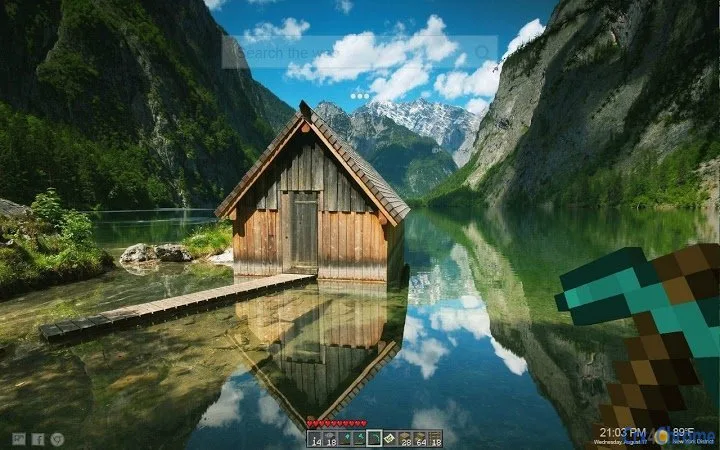
The software offers a customizable Minecraft-themed experience for users of Google Chrome and Chrome OS. Designed as a browser extension, it transforms the default new tab page into a dynamic, immersive environment inspired by the popular game. The primary purpose is to enhance the browsing experience by replacing standard tab backgrounds with high-resolution, themed imagery and interactive elements. Users can enjoy a fresh, visually engaging interface each time they open a new tab, with content refreshed regularly to maintain novelty.
Target users include casual Chrome users, Minecraft enthusiasts, and individuals seeking aesthetic personalization for their browser. The application supports a variety of visual themes, including those inspired by popular Minecraft content such as Destiny Story Mode and other user-generated designs. It also integrates functional elements like weather, time, and date displays, offering both visual appeal and practical utility. The extension is built with user-generated content and publicly available assets, ensuring a diverse and continuously evolving gallery.
While the developer is not explicitly named, the software reflects a community-driven approach, emphasizing user contributions and feedback. Real-world usage scenarios include daily browsing, creative inspiration, and personal expression through digital customization. The extension is intended for desktop use across multiple platforms, with no indication of mobile or non-Chrome support.
Key Features & Capabilities
- Daily Fresh Themes – New Minecraft-inspired backgrounds are automatically added on a regular basis, ensuring users always have access to updated and visually engaging tab designs.
- High-Resolution Imagery – All images are optimized for various screen sizes and resolutions, providing crisp visuals on any display without distortion.
- Interactive Mini Games – A curated selection of mini games is available within the tab interface, allowing users to play without leaving the browser.
- Real-Time Information Display – Users can enable weather, time, and date widgets directly on the tab, combining functionality with theme aesthetics.
- Community-Driven Content – Themes are sourced from public websites and licensed under Creative Commons, with proper credit given where applicable.
- Custom Wallpaper Selection – Users can browse and select their preferred theme, making the new tab page a personalized digital space.
These features support a seamless blend of entertainment and productivity. For example, a user can start their day with a themed tab that shows the current weather and time, while also having the option to play a quick mini game. The integration of user-generated content ensures a constantly expanding library, reducing the need to search externally for wallpapers.
User Interface, Workflow & Performance
The user interface is centered around the new tab page in Google Chrome, where the Minecraft theme is applied as a background with embedded interactive elements. Navigation is intuitive, relying on standard browser behavior—users open a new tab and are immediately presented with the themed layout. The interface includes visual cues for enabling or disabling features like the weather widget or mini games.
Workflow efficiency is high, as setup is minimal. After installation, the extension activates automatically, and users can begin selecting themes immediately. The extension does not require complex configuration or ongoing maintenance. Performance observations are based on general software behavior patterns; no performance bottlenecks were reported in the provided information.
The developer did not specify resource usage details. However, given the file size of 1.5 MB and the nature of the content (static images and lightweight scripts), it is expected to have minimal impact on system performance. Stability is assumed to be consistent with standard Chrome extensions, though no official reports on crashes or freezes were provided.
Compatibility & System Requirements
The software is compatible with Windows, Mac, and Chrome OS, supporting the latest versions of Google Chrome on these platforms. It is designed specifically for desktop environments and does not extend to mobile or non-Chrome browsers.
The installation size is 1.5 MB, which is compact and suitable for most users. The developer did not provide additional system requirements, such as minimum RAM, CPU specifications, or disk space. Exact system requirements were not listed, so users should ensure their device meets standard Chrome extension compatibility standards.
Platform compatibility information is limited to the operating systems listed. No details were provided about hardware acceleration, GPU support, or network dependencies. Users should expect standard browser-level compatibility across supported systems.
Pros and Cons
Pros
- Visually engaging Minecraft-themed new tab experience
- Regular updates with fresh, high-resolution backgrounds
- Integrated mini games for entertainment
- Functional widgets for time, weather, and date
- Compact file size (1.5 MB)
- Community-driven content with proper attribution
- Free to use with no hidden costs
Cons
- No information on performance impact or resource usage
- Limited to Chrome and Chrome OS platforms
- No details on update frequency or version history
- Dependent on external content sources for images
- Customization options may be limited beyond theme selection
FAQ Section
Is this extension compatible with all Chrome versions?
The extension is designed for Google Chrome on Windows, Mac, and Chrome OS. Compatibility with specific Chrome versions is not specified, but it is expected to work with current and recent releases.
Is the software safe to install?
As a Chrome extension, it operates within the browser’s security sandbox. The developer states that all images are sourced from public websites or licensed under Creative Commons, reducing the risk of malicious content.
How often are new themes added?
New themes are added regularly, with weekly updates to the gallery, ensuring a fresh experience for users.
Can I use this extension offline?
Yes, once installed, the extension functions without an internet connection. However, new theme updates may require online access to download.
What type of license does this software have?
The software is free to use and does not require a paid license. It is distributed under a user-friendly model with no restrictions on personal or non-commercial use.
Final Thoughts
This Minecraft-themed Chrome extension delivers a unique blend of entertainment and utility, transforming the default new tab page into a dynamic, immersive environment. Its regular content updates, high-quality visuals, and functional elements like weather and mini games make it a standout choice for users who value both aesthetics and practicality. The free model and compact size enhance accessibility, while the community-driven approach ensures ongoing relevance.
While performance details and update frequency are not publicly disclosed, the overall design prioritizes simplicity, efficiency, and user satisfaction. It is ideal for Minecraft fans, casual users seeking personalization, and anyone looking to enhance their daily browsing experience with a creative twist.
Download Minecraft-Themed Chrome Tabs with Daily Updates now.







